
Veeam Clean Room Recovery Runbook

The first time you run a clean room recovery should not be the day you need it. Yet that is exactly how most organizations are set up today. They have backups. They have immutability. Some even have a document titled "Cyber Recovery Runbook" that nobody has opened since the auditor asked for it. What they do not have is a practiced, orchestrated path from "we've been hit" to "we are validating clean workloads in an isolated environment right now."
A clean room is not a place. It is a workflow. It is the repeatable process of taking an immutable copy of your data, standing it up in an isolated environment, proving it is clean, and promoting it back to production with an audit trail. If your clean room requires heroics, it will fail under the pressure of a real incident. If it is orchestrated, documented automatically, and drilled quarterly, recovery becomes a routine instead of an event.
This guide covers the full picture with Veeam. The clean room you can build today with Veeam Backup & Replication (VBR) and Veeam Recovery Orchestrator (VRO) for the workloads that matter most: orchestrated, documented automatically, and drilled on a schedule.
What a Clean Room Actually Needs to Do
An Isolated Recovery Environment (IRE) gets defined a lot of different ways in this industry, usually in whatever way the vendor's product the answer. Here is a baseline definition of what an IRE and Clean Room is:
Requirement | What it means in practice |
Establish a minimum viable company | A business impact assessment that identifies the applications the business cannot operate without. If you cannot name your top 20 workloads and their boot order, start there. |
Validate clean with SecOps integration | Scanning restore points for malware with alerts forwarded to the security team. Recovery point selection is a security decision, not a backup decision. |
Test both disaster and cyber recovery | An automated, repeatable testing process. The same clean room should exercise both scenarios, because in real life you rarely know which one you are in for the first few hours. |
An isolated environment | Logically air-gapped with compute available. Isolation must be architectural, not procedural. A checklist that says "remember to disconnect the network" is not isolation. |
An identity safety net | Identity recovery tested at both item level and at scale. Identity is where most clean room designs quietly fall apart. |
Ensure survivable data | An isolated, immutable copy of the data. The foundation everything else stands on. |
Who Owns What: The Cyber Recovery RACI
To say technology is half the battle in a cyber recovery would be an oversimplification. People and process and the level of preparation prior to the incident are the majority of the battle in a cyber recovery. There is a misconception that the data protection team will choose the clean restore point. The recovery point decision belongs to the security team, and the execution belongs to the data protection team. Here is that expanded into the full matrix.
R is responsible (does the work), A is accountable (owns the outcome, one per row), C is consulted, I is informed.
Activity | Security / IR | Data Protection | IT / App Owners | Executive | Legal / Compliance |
Declare incident, activate IR plan | R | C | C | A | I |
Bound the compromise window (forensic timeline) | A / R | C | C | I | I |
Select the clean restore point | A | R | C | I | I |
Maintain immutable copies, 4-eyes, platform hardening | C | A / R | I | I | I |
Stand up the clean room and isolation | C | A / R | R | I | I |
Run threat scans and validate restore points | A | R | C | I | I |
Choose the path: recover, rebuild, decrypt, accept loss | R | C | C | A | C |
Remediate workloads in staging | A | C | R | I | I |
Approve promotion to production | C | R | C | A | I |
Re-protect remediated systems | I | A / R | C | I | I |
Preserve evidence, apply legal hold | C | R | I | I | A |
Regulatory and disclosure obligations | C | C | I | A | R |
Run quarterly drills, publish results | C | A / R | R | I | I |
The path decision is accountable to the executive, not to IT or security, because recover-versus-rebuild-versus-accept-loss is a business risk trade, and the drill row is accountable to data protection because a resilience program needs one owner who is graded on it. Fill in names, not team labels, and revisit the matrix at every drill. A RACI with a vacant seat is a RACI that fails silently.
Alignment with Regulations and Frameworks
Auditors have stopped asking whether you have backups. They are asking whether you have proven you can recover, measured, and with evidence. When organizations have a high clean room recovery maturity they meet a growing list of regulatory requirements.
Regulation / framework | What it asks for | What Veeam provides |
DORA (EU financial entities) | Backup policies with restoration and recovery procedures, plus digital operational resilience testing, including scenario-based testing of ICT recovery (Articles 11-12, 24-26). | Quarterly clean room drills are scenario-based recovery testing by definition. VRO plan reports document execution, tested RTOs, and results, generated automatically. |
NIS2 (EU essential and important entities) | Risk management measures covering backup management, business continuity, and crisis management (Article 21). | Survivable immutable copies plus a drilled, documented recovery path from them. The maturity ladder is a defensible implementation of "backup management and business continuity." |
NYDFS 23 NYCRR 500 (NY financial services) | Incident response and BCDR plans, backups maintained isolated from network threats, and periodic testing of the ability to restore from those backups (Section 500.16, as amended). | Vault and hardened repositories are the isolated backups. The drill checklist is the restore testing. The plan reports are the proof. |
HIPAA Security Rule (US healthcare) | A contingency plan: data backup plan, disaster recovery plan, and testing and revision procedures (164.308(a)(7)), with proposed rulemaking pushing toward mandatory testing and defined restoration timeframes. | Tested RTOs against the minimum viable company answer where the rule is heading, not just where it is. Identity recovery drills cover the systems PHI access depends on. |
PCI DSS 4.0 (cardholder data) | An incident response plan that is tested at least annually, with defined roles and communication procedures. | The first-24-hours sequence, drilled quarterly, exceeds the annual testing bar, and the 4-eyes approval trail documents who did what. |
ISO/IEC 27001:2022 | Information backup (A.8.13), ICT readiness for business continuity (A.5.30), and maintaining security during disruption (A.5.29). | The clean room is ICT readiness made testable: an isolated environment where continuity is exercised rather than asserted. |
NIST CSF 2.0 | The Recover function: executed recovery plans, verified restoration integrity, and recovery communications. | Threat Hunter and YARA validation before promotion is restoration integrity verification. The drill cadence is plan execution. The reports are the communications artifact. |
SEC cyber disclosure (US public companies) | Material incident disclosure on a four-business-day clock, plus disclosure of risk management processes. | A bounded compromise window and tested RTOs turn the disclosure from speculation into facts. The preserved forensic timeline and evidence retention support what gets filed. |
The regulator, the auditor, and the cyber insurer do not want your policy PDF. They want the drill report with dates, tested RTOs, and scan results, which the orchestrated tier generates as a byproduct of doing the work.
NOTE: This section maps capabilities to requirement themes and is not legal or compliance advice. Regulations evolve and interpretations vary by jurisdiction and sector. Validate specific obligations with your compliance and legal teams. |
Recover, Rebuild, Decrypt, or Accept Data Loss
In our industry we assume clean room recovery is the only viable solution from a cyber incident. It certainly is the most optimal, but every business faces 4 options during a cyber event. They need to quick validate if they can recover cleanly because they proactively did everything this paper discusses, or they have to move to less optimal options, whether that be rebuilding, decrypting, or accepting the data loss.
Path | When it is the right call | What it costs |
1. Clean Room Recovery | A clean restore point exists within acceptable RPO. The default outcome when the tiers in this guide are working. Recover to staging, remediate (IOC removal, patching, hardening), promote. | Any data written after the clean point is lost unless salvageable at file or database level. Remediation effort still applies. Fastest path back by far. |
2. Rebuild OS, recover data only | Dwell time is long or unbounded, OS-level persistence or rootkits are suspected, or compliance demands a known-clean operating system. Build fresh from a golden image, then restore only the data. | Slowest clean path. Requires maintained golden images and application reinstall discipline. Veeam's file-level, disk-level, and application-item recovery decouple the data from the compromised OS, and the portable backup format restores that data onto fresh builds on any platform. |
3. Decrypt | No clean copy exists anywhere. This is the last resort, and its presence on this list is honest acknowledgment that some organizations arrive here. Coveware by Veeam brings incident negotiation expertise, decryptor validation, and compliance checks to a path nobody should walk alone. | Decryptors are slow, frequently buggy, and often partial. Payment guarantees nothing and may be legally restricted. Walking this path is evidence the resilience program failed. The goal of every other page in this guide is to make this row irrelevant. |
4. Accept data loss | A clean point exists but it is old, and the delta is low-value, reproducible, or re-creatable from other systems of record. Rolling back and consciously forfeiting the gap can beat days of forensics on data that was not worth the recovery cost. | The forfeited data is gone. This is a business decision with executive sign-off, not an IT decision. Document what was lost and why the trade was made, because the auditor will ask. CDP journal granularity shrinks this gap from days to minutes for the workloads it protects, which is often the difference that keeps this path off the table. |
Recovery Point: Dwell Time Changes Everything
Dwell time, meaning the window between initial compromise and detection, has been collapsing. Attackers used to sit in environments for weeks. Increasingly they are detected in days or even hours, partly because encryption-first attacks announce themselves and partly because detection tooling has genuinely improved. The recovery implication is significant: if dwell time is short, your most recent recovery points are probably clean.
Short dwell time: storage snapshots and replicas are in play
If the security team can establish that the compromise began 36 hours ago, the storage snapshot from three days ago is a legitimate, and dramatically faster, recovery point. Veeam can orchestrate recovery directly from storage snapshots on supported arrays and can fail over VM replicas into an isolated clean room network through VRO. Replicas are already hydrated, sitting in native VM format, waiting to boot. When the forensic timeline supports it, this is your lowest RTO path by a wide margin. The clean room process stays the same. Boot into isolation, scan, validate, promote. Only the source changes.
CDP takes this further. Veeam Continuous Data Protection replicates vSphere VMs with an RPO measured in seconds, and Universal CDP, new in V13, extends that to any Windows or Linux machine, physical, virtual, or cloud, replicated to vSphere in a ready-to-start state. The clean room value is not just the low RPO. It is the journal. Nightly backups force you to choose between yesterday and the day before. The CDP journal lets the security team scrub backward through short-term restore points and land minutes before the stamped detection time, instead of forfeiting a full day of data to get behind the compromise. For the workloads where the delta is the business, revenue systems, order books, patient records, that granularity is the difference between a rollback nobody notices and a rollback that makes the news.
Same honesty as replicas and snapshots: CDP replicas are a speed and granularity play, not an immutable copy. And with seconds-level RPO, the newest journal points may contain the attack itself. The discipline is scrubbing to a validated point behind the compromise window, then scanning it like any other candidate before promotion.
Longer or uncertain dwell time: immutable backups
When the security team cannot bound the compromise window, or when the window predates your snapshot and replica retention, you fall back to backup copies. This is where restore point scanning earns its keep. Veeam Threat Hunter and custom YARA rules (YARA is a pattern-matching language security teams use to describe malware signatures) scan restore points inside the clean room so only validated data goes back to production.
Worst case: the offsite copy
Production is untrusted, on-site infrastructure is untrusted, and possibly the backup infrastructure itself is in scope. This is what your offsite immutable copy exists for, and it is where Veeam Vault anchors the design.
Scenario | Recovery source | Why |
Dwell time bounded in hours to days | CDP replicas (seconds-level journal), storage snapshots, VM replicas | Already hydrated, native format, lowest RTO. CDP journal granularity lands minutes behind the compromise instead of a day. Valid when the forensic timeline confirms the point predates compromise. |
Dwell time uncertain or longer | Immutable backup copies (hardened repository, object lock) | Scanned with Threat Hunter and YARA in the clean room before promotion. |
Backup infrastructure in scope | Veeam Vault (offsite) | Immutable, encrypted, logically air-gapped, independent of on-site infrastructure. |
SOC and SOAR Integration for Better Decision Making
The compromise window does not get established by the backup team squinting at job history. It comes from the security stack, and this is where Veeam's bidirectional SOC and SOAR integrations earn their place in the clean room design. Detection platforms including Splunk, CrowdStrike, Palo Alto Networks, Fortinet, and ServiceNow integrate to enrich detection and automate response. The flow runs both directions: Veeam's scanning results, entropy analysis, and indicators of compromise forward into the SIEM where the security team already lives, and the security stack pushes back into Veeam through the Incident API.
When the EDR or SOAR platform detects compromise, it can mark the affected restore points as suspect and, when configured, trigger an immediate quick backup, stamping the moment of detection directly onto the backup timeline. That stamp is the starting point for the clean-point search. Instead of the security team handing the backup team a timestamp over a bridge call at 3 a.m., the timeline is already annotated when the clean room work begins.
It’s important to note the recovery point decision belongs to the security team, and the execution belongs to the data protection team.

Survivable Backup Data:
Any backup copy job destination is a legitimate clean room source, as long as it is immutable. A Veeam Hardened Repository on-prem. An S3-compatible object storage bucket with Object Lock. Vault in the cloud. All of these work. Immutability is the non-negotiable. If the attacker can modify or delete your source data, nothing downstream of it matters.
That said, Veeam Vault is emphasized as the offsite copy for three reasons:
It checks every survivable-data box in one move. Immutable, encrypted, offsite, and logically air-gapped. No infrastructure for you to patch, no storage array for the attacker to find credentials for, no capacity planning exercise. It is the 3-2-1-1-0 offsite copy without the second data center.
It is storage, not compute. Several competing architectures run their backup storage on a scale-out compute layer. That means the offsite copy carries a compute bill whether you are recovering or not, and recovery through those platforms means standing up standby clusters before you can even retrieve metadata. Vault is built on cost-effective object storage. Data sits cheap and boots fast when needed.
It is where clean-point identification happens. Threat Hunter and YARA scanning run against restore points in Vault, so the same copy that survives the attack is the copy you validate before recovery. No shuffling data between a vaulting product and a scanning product.
Source | Immutable | Clean room fit |
Veeam Vault | Yes, by default | Emphasized offsite anchor. Survivable, encrypted, zero infrastructure, scan-in-place. |
Veeam Hardened Repository | Yes | Excellent on-prem source. Standard Linux deployment for the clean room copy (see requirements). |
S3-compatible object storage with Object Lock | Yes | Excellent. Supports read-only concurrent access from the clean room, simplifying the isolation cycle. |
CDP replicas, storage snapshots, VM replicas | No (speed play) | Valid short-dwell recovery points with security sign-off. CDP and Universal CDP add seconds-level journal granularity. They complement the immutable copy. They do not replace it. |

Protecting the platform itself: 4-eyes authorization
A hardened backup platform is a prerequisite though to a survivable backup. Attackers do not just encrypt production anymore. They go after the backup infrastructure first, and the fastest path is a stolen backup administrator credential. Immutability protects the data on disk. 4-eyes authorization protects the control plane. With 4-eyes enabled, destructive operations like deleting backups, removing repositories, or changing security settings require approval from a second backup administrator before they execute.

Clean Room You Can Build Today
No new licenses. No new appliances for VDP Foundation or Advanced customers. Every component below ships with the platform you already run.
The recipe: an isolated host or small cluster with no routes to production, a recovery VBR server inside that island, and your immutable copy as the source. As of V13.1, that recovery VBR can attach an immutable object storage repository in read-only mode. Instant recovery boots workloads directly from backup storage into the isolated network. SureBackup and DataLabs automate the validation: boot the VM in a sandboxed network, confirm the OS starts, confirm services respond, run malware scans, run custom scripts. Threat Hunter and YARA rules scan the restore points before anything is trusted. This has been shipping for years, and plenty of organizations run a credible clean room on exactly this and nothing else.

For agent-based workloads, physical Windows and Linux servers restore into the isolated environment as VMs or via instant disk publish.

Orchestrated Clean Room with VRO
This is the tier where the clean room stops being a runbook and becomes a rehearsed capability. The reference architecture comes from Veeam's Solutions Architect team, and the full best practices page lives at bp.veeam.com. This section summarizes the design. Scope note up front: this workflow covers vSphere and Hyper-V image backups. Everything it does not cover can be easily done with just VBR.
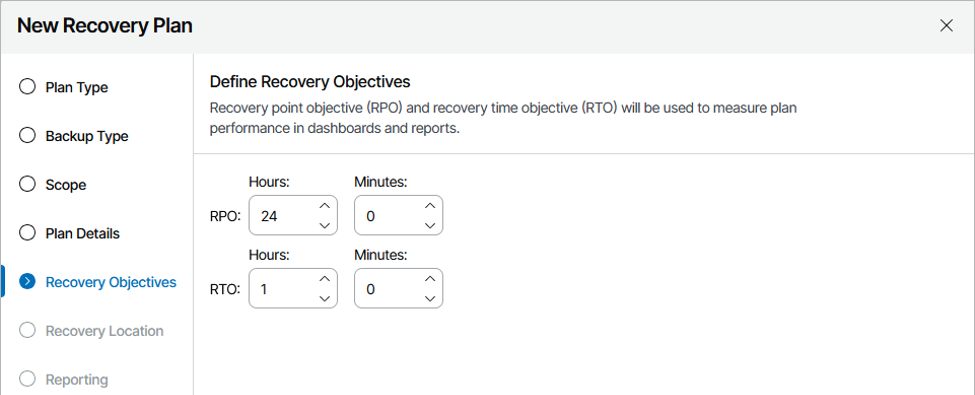
The on-prem clean room is a small, isolated environment containing a backup repository, an embedded Veeam Backup & Replication (VBR) server running inside the VRO appliance, and enough compute to boot and test your minimum viable company. Backup copies from production land on the clean room repository, which is immutable. The embedded VBR inside VRO reads that copy, imports the backups, and all restore and testing activity happens in full isolation from production.
NOTE: The repository must never be written to by production and the clean room simultaneously. Concurrent write access is unsupported and can corrupt data. Object storage accessed read-only is safe, and as of V13.1, immutable object storage repositories attach in read-only mode as a supported configuration (see below). |
This is why immutability on the repository is strongly recommended even inside the clean room design. It protects the data from corruption or modification even if someone fat-fingers the isolation schedule.
Requirements worth knowing before you build
Requirement | Detail |
vCenter inventory connection | VRO requires an initial connection to the production vCenter to gather inventory and build restore plans using vSphere tags. Connection to production VBR is optional, needed only for plans based on backup jobs. |
Workload support | vSphere and Hyper-V image backups today. Agent and NAS backups are not supported in this workflow yet, though scripted workarounds exist in the community library. |
Hardened Repository deployment | Hardened Repositories deployed via the Veeam Infrastructure Appliance ISO are not currently supported in this workflow. Use a standard Linux Hardened Repository for the clean room copy. |
Repository sizing | Prefer multiple smaller repositories with shorter retention. Rescan time during import scales with content, and rescan time is dead time in your RTO. |
Threat Hunter in the clean room | Enable it on the embedded VBR in the VRO server. Internet access (proxy supported) is required for activation and current signatures. |
Post-connection wait | After connecting a repository to the embedded VBR, wait 10 minutes before running plans. The Orchestrator needs that window to collect restore point information from VBR. |
Read-only repository mode
Version 13.1 turns the concurrency workaround into a product feature. A second backup server can now attach an immutable object storage repository in read-only mode and use it for restores, recoverability checks, and forensic or ransomware scans, without taking ownership away from production. Read that through the clean room lens: older clean room designs required careful choreography so production and the clean room never touched the repository at the same time. For immutable object storage, read-only mode eliminates that risk at the platform level. The clean room VBR mounts the copy, scans it, restores from it, and can never modify it, while production keeps writing uninterrupted.
Two implementation details matter. First, select read-only mode when connecting the repository on the second server. Second, the credentials used to add the repository should themselves carry read-only permissions, because full-access credentials behind a read-only mount can produce unpredictable behavior. Defense in depth applies to the clean room too: the mode constrains the software, the credentials constrain everything else. And to be precise about scope, read-only mode governs what the secondary server will do. It does not isolate the storage network for you, and it does not replace segmentation or immutability. It removes the concurrency problem, which was the most fragile part of earlier designs.
This also strengthens a scenario that used to be a recovery problem in itself: a compromised or unavailable production backup server. Historically the path to the data ran through it. With read-only attach, a standby administrative environment is a supported configuration rather than a workaround, which is exactly what a clean room is.

Stronger isolation: the Fibre Channel variant
For organizations that want the strongest isolation, the clean room repository can be backed by an external storage system using storage snapshots or storage replication over Fibre Channel instead of the network. A dedicated Linux server inside the clean room mounts the replicated LUN or snapshot, and the embedded VBR imports the backups from there. No network path between production and clean room exists at all, and there is zero concurrency risk. This is also where replicas and storage snapshots shine as recovery points for short-dwell scenarios: the data is already sitting on an array the clean room can reach, in a format that boots immediately.
Validation inside the room
This is where the Veeam approach separates from the build-it-yourself model. SureBackup and DataLabs have automated isolated recovery verification on-prem for years: boot the VM in a sandboxed network, confirm the OS starts, confirm services respond, run malware scans, run custom scripts. VRO extends that into full orchestrated plans with automatically generated documentation and RTO/RPO reporting. When the auditor, the regulator, or the board asks "can you recover, and can you prove it," the answer is a scheduled report, not a scramble.
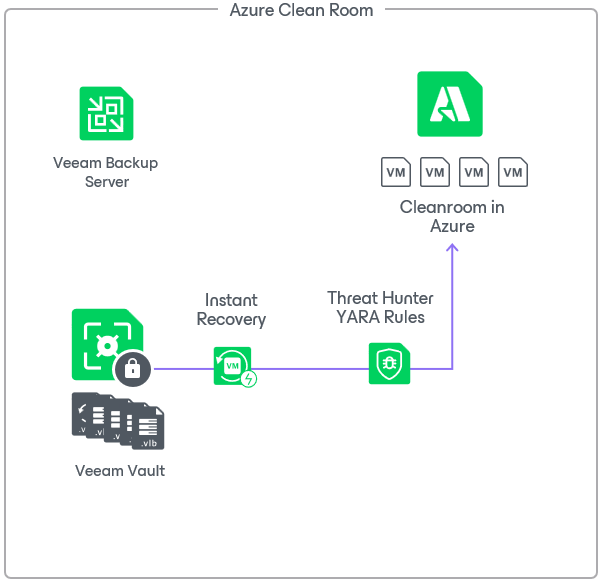
Cloud Clean Room: Vault Plus Instant Recovery to Azure
Not everyone can afford, or wants to maintain, a physical clean room. DR to the cloud is becoming a more common design. Vault for immutable storage and clean-point identification, an isolated Azure VNet for live forensic validation, and Instant Recovery to Azure as the mechanism that makes it fast enough to meet real RTOs. No VRO required. VRO layers orchestration on top, covered below.

Instant Recovery to Azure boots the VM live in Azure before the full migration to native Azure Managed Disks completes, similar to how instant restore to VMware works on-prem. It is not limited to native Azure workloads. Backups of VMware, Hyper-V, AHV, Proxmox, HPE Morpheus, EC2, Azure, GCP, and physical Windows and Linux servers can all instant-restore into Azure. Read that list again through a clean room lens: your recovery target no longer depends on your production hypervisor surviving the attack.
The workflow
Backup copies land in Vault. Immutable, encrypted, offsite. Even if every snapshot and every on-prem copy is destroyed, this copy is intact.
The security team bounds the compromise window. Veeam's Indicators of Compromise mapping to the MITRE ATT&CK framework and threat scanning against restore points in Vault feed the clean-point decision.
Threat Hunter and YARA scan the candidate restore point before anything boots.
Instant Recovery boots the workload into an isolated VNet with no routes to production. The isolation is architectural. There is no procedural step where someone can forget to disconnect something.
Validation runs, then promotion. The workload either migrates to native Managed Disks and takes over, or it fails validation and you iterate to an earlier point. Only validated data goes forward.
Orchestrating it with VRO
VRO orchestrates this end to end with Azure Recovery Locations. Add the clean room Azure subscription (or a non-peered VNet in an existing subscription) to VBR, define the recovery location in VRO with network mapping to the isolated VNet, subnet, and security group, then attach PowerShell plan steps for verification and automated teardown of Azure resources after testing. Members of the Veeam community have documented this pattern in detail, including running full restore-verify-teardown cycles of a 250 GB VM a dozen times for pennies of Azure spend, because the resources exist only for the duration of the test.
Operational points that save you during a real event
Pre-deploy Helper Appliance Templates. Veeam publishes OS-specific helper templates to the Azure Compute Gallery in your target region, which meaningfully cuts time-to-first-boot. If your first instant restore happens during a live incident and the templates are not staged, you are donating time to the attacker. Make this a quarterly drill item.
Use existing resource groups, NSGs, and storage accounts for mass restores. Azure API throttling is real, and it will bite you exactly when you are restoring 200 VMs at 2 a.m.
The isolated recovery VNet is not optional. Booting a potentially compromised VM into a production VNet to "verify it works first" always ends the same way: it makes things worse. Build the isolated network. It takes 15 minutes. Use it every time.
The cost advantage with Veeam
Recovering from Vault means booting directly from Blob-backed storage with minimal compute and migrating in the background. The appliance-centric alternative means either restoring through a compute-heavy intermediary or landing in dedicated bare-metal cloud infrastructure like AVS or NC2 at premium pricing. The cloud bill during recovery is part of your total cost of protection whether the vendor quote mentions it or not.
Identity: The Critical Path Nobody Drills
Here is the uncomfortable truth about most clean room tests: they boot application VMs, watch the OS load, and declare victory. Then the real incident hits and nobody can log into anything, because identity was never part of the plan.
Identity is the critical path to recovery. Applications do not work without authentication, and modern environments run overwhelmingly on non-human identities: service accounts, service principals, OAuth configurations, machine identities. If Active Directory or Entra ID is compromised or unavailable, your beautifully validated application VMs are furniture. A clean room design has to answer for both directions.
Active Directory | Entra ID |
Instant item-level recovery of individual AD objects directly from image-level backups, without restoring entire domain controllers, for the surgical cases. | Object recovery at scale for users, groups, and directory roles without a full tenant rollback. |
Forest-level recovery that performs the full VM restore and runs post-restore activities to bring AD up cleanly, for the catastrophic cases. | Side-by-side comparison of property values between a restore point and production, so you can see exactly what the attacker changed. |
Threat detection at the AD server layer, watching for the tooling and behaviors attackers use against domain controllers specifically, because AD is where attackers go first. | Recovery of conditional access policies, service principals, and enterprise app settings, which is the part everyone forgets until the apps will not authenticate. |
Drill identity recovery both ways: item-level and at scale. It is called a safety net for a reason. It is the thing that catches everything else.
Returning to Production
The clean room is the middle of the story, not the end. The road back to production is where organizations get sloppy, because by this point everyone is exhausted and the pressure to declare victory is enormous. Four disciplines close it out properly.
Last-mile validation
Scan the remediated workloads one final time before promotion, with current threat signatures, not the ones from the day the incident started. Threat intelligence moves during a multi-day recovery, and the variant that hit you may have known indicators by day three that did not exist on day one. The final Threat Hunter pass is cheap insurance against promoting something the first scan could not see. Veeam has a named feature for exactly this: Secure Restore, which builds the Threat Hunter, antivirus, or YARA scan into the restore workflow itself, so the workload is verified as part of the restore rather than trusted after it.
Re-protect immediately
The first job after promotion is a backup job. The remediated, validated state of every recovered workload goes straight to the immutable copy as the new baseline. If anything resurfaces, you restore to the remediated state, not back to the pre-incident state that started this whole exercise. Skipping this step means your best restore point is still the compromised one.
4-eyes on the promotion
Promotion touches production, and production-touching operations during an incident are exactly when mistakes and malice hide best. 4-eyes authorization puts a second administrator on the destructive and irreversible actions, and the approval trail doubles as the change record your post-incident review and your insurer will both want.
Preserve the evidence
The infected restore points are evidence. Law enforcement and insurers may prohibit deleting them until investigations close, and your own post-incident review needs them. Put the compromised restore points and the forensic timeline under extended retention on the immutable copy, separate from the operational backup chain. Plan the storage for this in advance, because "we deleted the evidence to free up capacity" is a sentence you do not want to say to a regulator.
Clean Room Maturity Self-Assessment
Grade yourself honestly across seven dimensions and four levels.
Dimension | Level 1: Ad hoc | Level 2: Foundational | Level 3: Practiced | Level 4: Proven |
Survivable data | Backups exist. Immutability unverified. | Immutable copy (hardened repo or object lock). Offsite copy exists. | Vault or equivalent offsite anchor. 3-2-1-1-0 verified, dedupe caveats addressed. | Read-only standby attach (V13.1). Evidence retention tier planned and funded. |
Recovery point selection | Latest backup, always. | Security team consulted informally. | Dwell-time-driven: CDP journal, snapshots, replicas, or backups by compromise window. | Incident API stamps the timeline. Selection rehearsed with security in drills. |
Isolation | None. Restores land in production. | Manual isolated network, procedural controls. | Architectural isolation: isolated host or non-peered VNet, built and reusable. | Isolation is standing infrastructure, exercised quarterly, on-prem and cloud. |
Validation | Boot it and hope. | Antivirus scan after restore. | Threat Hunter and YARA on candidates. Secure Restore in the workflow. | Last-mile scan with current signatures gates every promotion. Results feed the SIEM. |
Identity recovery | Not part of the plan. | AD backups exist. Item-level restore tested once. | AD forest and Entra ID recovery both tested. Item-level and at-scale. | Identity boots first in every drill. Conditional access and service principals covered. |
Orchestration and proof | Tribal knowledge. | Written runbook, manually executed | VRO plans for the minimum viable company Documentation auto-generated. | Plan reports feed audits, insurers, and regulators without manual assembly. |
Governance and drills | No drills. No named owners. | Annual test. RACI drafted. | Quarterly drills. RACI filled with names. 4-eyes enabled. | Drills include workloads and path decisions. Gaps reported to executives honestly. |
Where the market actually sits: most organizations self-assess at Level 3 and drill at Level 1. The gap between what the runbook says and what the team has done with their hands is the single best predictor of how a real incident goes. Everything in this guide exists to move you one level to the right, one dimension at a time, starting with your lowest score.
Where the Assemble-It-Yourself Approach Falls Short
There is a school of clean room design built around scale-out backup appliances. The recipe: buy or stage a standby cluster, assemble a "digital jump bag" of ISOs and golden images in a file share, manually create isolated VLANs and virtual IPs on the cluster, retrieve metadata from the cloud vault to the standby cluster when disaster strikes, then walk through recovery via a lengthy deployment guide. These guides are thorough. They are also 60-plus pages of procedures a human executes under maximum stress, and every manual step is a place the recovery can stall. Four structural problems with that model:
Structural problem | The appliance model | The Veeam model |
Idle infrastructure | A standby cluster is capital expenditure waiting for a bad day. | Software you already own, data in a portable format, and either modest on-prem compute or cloud compute that exists only during recovery and testing. |
Storage coupled to compute | The offsite copy is expensive at rest and the recovery path runs through more of the vendor's own infrastructure. | Vault decouples them. Cheap at rest, fast in recovery. |
Procedural isolation | Manual VLAN creation, manual VIP assignment, manual firewall rules, verified by a human pinging things. Works until someone skips a step. | Architectural isolation: a non-peered VNet or a scheduled network window managed by scripts and orchestration. Does not depend on memory. |
Testing as an event | When recovery is a manual runbook, testing is a project, so it happens annually if at all. | Orchestrated plans make testing a scheduled job with automatically generated documentation. Recovery muscle is built through repetition. |
Data portability deserves more attention than it gets. Veeam backups are portable files. The same backup of a VMware VM can restore to VMware, Hyper-V, Nutanix AHV, native Azure, AWS, Google Cloud, or bare metal. Your clean room is not locked to the platform the data was born on. When the appliance model is your foundation, your recovery options are whatever the appliance supports, wherever the appliance lives.
The Quarterly Drill Checklist
# | Drill item |
1 | Confirm your minimum viable company list is current, with boot order and dependencies. |
2 | Run a full clean room cycle from at least two sources: your fastest (replica or storage snapshot) and your survivable (Vault or hardened repository). |
3 | Recover at least one Tier 1 workload (an agent-based physical server or cloud-native machine) alongside the orchestrated Tier 2 plan, so the manual path stays practiced too. |
4 | Verify Helper Appliance Templates are staged in every Azure region you would recover into. |
5 | Run Threat Hunter and a YARA rule against a real restore point and confirm alerts reach the security team. |
6 | Recover identity both ways: one AD object item-level, and one forest or tenant-scale exercise. |
7 | Run the Security & Compliance Analyzer against the backup infrastructure and remediate any configuration drift it finds, so the platform itself stays hardened between incidents. |
8 | Time everything. Compare against your stated RTOs. Report the gap honestly. |
Summary
The organizations that recover fastest treat recovery as a first-class engineering discipline. They do not buy a clean room. They practice one.
The Veeam version of this discipline is simple to describe even if the engineering behind it is not. Survivable data in Vault or any immutable copy destination. The fastest safe recovery point, which is increasingly a replica or storage snapshot as dwell times collapse.
Architectural isolation on-prem or in Azure through a non-peered VNet. Validation with Threat Hunter and YARA before anything touches production. And a ladder, not a cliff: with the VBR you already own covers every workload today, and VRO turns the workloads that matter most into a rehearsed, documented, one-click routine.
Define your minimum viable company. Pick your immutable copy. Build the isolated network, it takes less time than reading the other guys' deployment guide. Then practice until the answer to "can we recover?" is "we already have."

Comments