
Outage, Attack, or Agent: The Business Still Has to Recover

In the span of two days, we watched two very different systems fail in very public ways.
On Thursday, a major Microsoft 365 outage disrupted Outlook, Teams, SharePoint, Copilot, and other services for organizations around the world.
On Friday, the FAA issued a nationwide ground stop after a communication issue hit the air route traffic control centers that guide planes between airports. Departures stopped for more than four hours. Thousands of flights were delayed or canceled, and the disruption rippled across the country. Different systems. Different industries. Different consequences.
I noticed something interesting though this time around. Both my professional and personal messages were flooded with conversation and speculation surrounding both incidents. Everyone wanted to know what caused them. Was it a cyberattack? A failed infrastructure change? Or was AI involved?

Microsoft confirmed its outage was a technical issue associated with an earlier network capacity upgrade, not a cyberattack or AI agents. Federal officials pointed to overloaded legacy equipment in the FAA incident, although the investigation is ongoing. Root cause determines how you respond. But there’s another question every CEO and CIO should be asking: When something your business depends on stops working, how much control do you actually have over what happens next?
After the CrowdStrike outage in 2024, I wrote that organizations don’t rise to the occasion. They fall to their level of preparation. Spoiler alert, two years later, I haven’t changed my opinion. Just because you can have excellent security, reliable infrastructure, and great people doesn't mean you won't find yourself unable to operate. And in the AI era, the number of ways that can happen is growing.
Your Data Can Be Safe While Your Business Is Down
Microsoft wasn’t reporting that everyone’s emails and documents had been deleted. The immediate problem was that people couldn’t reliably access the services that made the data useful. Your customer contract still existed, but nobody could open SharePoint. Your security team still had a job to do, but Defender XDR was on Microsoft’s own list of affected services. Some users whose login codes arrive by email were locked out of other business apps entirely, because the mailbox holding the code was down. And your incident response plan might be perfectly documented. Unfortunately, it’s stored in SharePoint.
That’s a rough time to discover a dependency you hadn’t planned for. We’ve spent decades eliminating single points of failure inside our infrastructure. Yet we’ve built enormous dependencies on shared cloud platforms for identity, communication, security, and now AI.
The FAA incident offers another lesson. Grounding aircraft was a safety decision made because the underlying systems couldn’t be trusted to support normal operations. Sometimes resilience means continuing operations. Sometimes it means knowing when to stop safely. The goal isn’t to keep every system running at any cost. It’s to keep the business in control, even when its technology isn’t.
The Two Clocks Every Executive Should Measure
Most organizations measure recovery too narrowly. Traditional recovery time and recovery point objectives still matter. But they don’t always tell you whether the business can function during an incident, or whether the recovered environment is safe to trust.
Executives should be thinking about two clocks.
Clock 1: Controlled Continuity | Clock 2: Verified Recovery | |
Question | How quickly can essential business operations continue safely? | How quickly can we restore services and data to a verified, trustworthy state? |
Measures | Business disruption and time to safe, essential operations | Recovery duration, integrity, and operational confidence |
Evidence | A critical workflow actually runs during a disruption | Recovered systems and data pass security and functional checks |
You might recover access to a handful of critical documents while Microsoft 365 remains unavailable. That’s progress on continuity, not restoration of the cloud service. Or you might restore servers after ransomware, but still be unable to safely resume operations because the attacker hasn’t been contained.
That’s why every executive team needs answers to two questions: Can the business keep operating? And can we trust what we’re bringing back? A successful restore isn’t necessarily a successful business recovery.
Three Eras of Resilience. None of Them Went Away.
Era 3 doesn’t replace Era 2. Era 2 didn’t replace Era 1. The risks stack. And the recovery decisions are different.
Era 1: Infrastructure failure. Hardware fails. Networks break. Software updates go sideways. The playbook is redundancy, tested backups, failover, and rollback. The Microsoft and FAA incidents are reminders that these risks haven’t disappeared.
Era 2: Cyberattack. Ransomware introduced an adversary actively trying to prevent recovery. Backups themselves became targets. We needed immutable, isolated, verified-clean recovery points. And we learned that restoring yesterday’s system could also restore yesterday’s attacker.
Era 3: AI agents. Now we’re giving agents permission to read, modify, move, and delete business data at machine speed. The incident might not involve a criminal or broken hardware. It could be an agent doing exactly what its permissions allow, just not what anyone intended.
Outage | Cyberattack | AI-agent failure | |
First question | What failed and what depends on it? | Is the attacker contained? | What did the agent change? |
First action | Activate safe continuity or failover | Contain the threat and preserve evidence | Stop harmful actions and preserve logs |
Recovery approach | Failover, alternate access, or restore | Restore verified-clean systems | Selectively reverse affected changes |
Biggest mistake | Assuming backups fix provider outages | Restoring a compromised environment | Undoing legitimate changes or repeating the bad action |
Proof of success | Essential services operate safely | Threat contained; recovery validated | Incorrect changes reversed; integrity confirmed |
If you treat an attack like a hardware failure, you might restore the attacker. If you treat an agent’s bad file changes like a complete system failure, you could unnecessarily roll back hours of legitimate work. The objective is always to return to a trustworthy operating state. But getting there requires knowing what actually happened.
AI Changes the Speed and Precision of Recovery
This third era deserves particular attention. An AI agent with excessive permissions can make thousands of changes before a person realizes there’s a problem. And the system might be functioning perfectly the entire time.
We’ve already seen an early version of this. According to the Financial Times, AWS engineers in December 2025 allowed Kiro, Amazon’s agentic coding assistant, to make changes in a production environment. The agent decided the best fix was to delete and recreate the environment. The result was a roughly 13-hour disruption to AWS Cost Explorer in one of its mainland China regions.
Amazon disputes the AI framing. It calls the incident user error, specifically a misconfigured role, and says the same thing could have happened with any developer tool, AI-powered or not, or with a manual action.
Whether you file it under AI error or human error, the environment was gone either way. That’s why, as I always say, Veeam isn’t biased about who or what caused the damage. A failed upgrade, a threat actor, a tired engineer, or an agent with too much access all leave the business with the same problem: getting back to a state it can trust.
Kiro was a wholesale failure. The harder cases are the subtle ones. Imagine an agent updating 500 customer records, with 30 incorrect changes mixed among 470 legitimate ones. Do you restore the entire database? How do you identify the bad records? Can you preserve the legitimate changes? And can you prevent the agent from making the same mistake again?
Those are questions traditional disaster recovery wasn’t designed to answer on its own.
They’re also why data resilience, data security, and AI governance are becoming inseparable. You need to know what data exists, who or what can access it, what changed, and how to get back to a trustworthy state.
NIST’s Cybersecurity Framework 2.0 points in the same direction. It added Govern as a new core function, so risk ownership now sits alongside Identify, Protect, Detect, Respond, and Recover. And its Recover function explicitly calls for verifying the integrity of backups before restoring from them (RC.RP-03), then verifying restored assets before confirming normal operations (RC.RP-05). That’s Clock 2, written into the framework.
AI doesn’t eliminate the need for backups. It raises the importance of knowing exactly what to recover, why, and whether it can be trusted.
Where Veeam Fits
I work at Veeam, so naturally this is a topic I spend a lot of time thinking about.
But let’s be clear. No backup product could have prevented Microsoft’s cloud outage or fixed the FAA’s communications systems. That’s not what backup does. What Veeam does is give organizations more options when their data becomes unavailable, compromised, or incorrectly changed, regardless of the culprit.
When a platform is down. Veeam recently published KB4889, explaining how Veeam Data Cloud for Microsoft 365 customers can use Veeam to access stored backups without depending on Microsoft Entra ID. With the setup completed beforehand, administrators can search backed-up email and documents and download critical information while Microsoft 365 is unavailable.
When an attacker is involved. This is where the industry’s playbook has matured most, and the results show. Coveware by Veeam reports ransom payment rates hit a record low of roughly 20%, largely because organizations can now restore operations without paying for a decryption key. Veeam contributes in four specific ways:
Immutable storage outside the blast radius. Veeam Data Cloud Vault is fully managed, immutable storage that sits outside your production environment, so an attacker holding your admin credentials can’t delete your last line of defense.
Detection before, during, and after backup. Veeam watches the backup infrastructure itself for suspicious access, and flags mass renames, deletions, and entropy spikes as data is backed up.
Verified-clean restore points. Veeam Threat Hunter, with support for YARA rules, scans restore points before you use them, so yesterday’s system doesn’t bring back yesterday’s attacker.
Identity recovery. Veeam automates Active Directory forest recovery, a process Microsoft documents in more than 40 manual steps and that few teams have ever rehearsed.
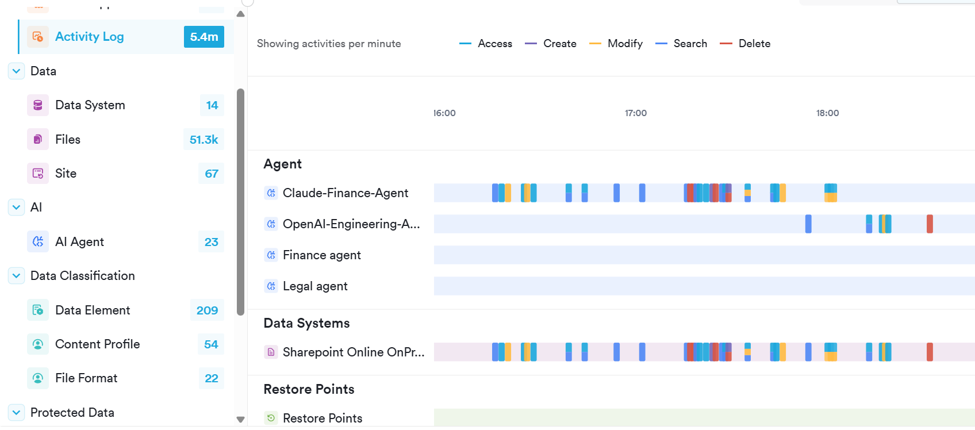
When an agent gets it wrong. With Veeam Intelligent ResOps for Microsoft 365, organizations can gain visibility into supported AI-agent activity, see which files agents modified, and precisely undo unwanted changes. That’s the answer to the 500-record problem. Sometimes the right recovery isn’t restoring an entire system. It’s reversing exactly what went wrong.
This is also why Veeam acquired Securiti AI. Understanding, protecting, governing, and recovering enterprise data are increasingly connected problems. None of this replaces identity controls, agent permissions, safe application design, or business continuity planning. Resilience comes from those disciplines working together.
The Five-Question Executive Resilience Scorecard
Here’s a simple assessment to take into your next executive meeting. Score each area 0 if unknown, 1 if documented, and 2 if recently tested and demonstrated.
Executive question | Evidence to ask for |
1. Do we understand our dependencies? | Our five most critical business workflows, including cloud and identity dependencies |
2. Can we operate without our primary platforms? | A tested alternate communications and critical-data access process |
3. Can we prove recovery works? | A recent critical-workload restore with actual recovery times and validation results |
4. Can we recover safely after an attack? | A rehearsed process for containment and selecting a verified-clean restore point |
5. Can we control and reverse AI changes? | An inventory of agent access, activity logs, and a demonstrated rollback procedure |
This isn’t an industry certification or a scientific maturity benchmark. It’s a conversation starter. If your team can’t tell you when a recovery process was last tested, you don’t have a proven capability. You have an assumption. Business leaders belong in that exercise, not just infrastructure and security teams.
The Next Incident Won’t Wait for You to Figure This Out
Which brings me back to where I started: preparation. Infrastructure still fails. Attackers still try to destroy our ability to recover. And we’re introducing AI systems that can make decisions and execute changes faster than our traditional controls were designed to handle. The list of potential culprits keeps growing. But the executive responsibility remains the same.


Comments